> ## Documentation Index
> Fetch the complete documentation index at: https://spacesail.mintlify.site/llms.txt
> Use this file to discover all available pages before exploring further.
# Manage Knowledge
> Attach Knowledge to your AgentOS instance
You can manage Agno Knowledge instances through the AgentOS control plane.
This allows you to add, edit and remove content from your Knowledge bases
independently of any specific Agent or Team.
You can specify multiple Knowledge bases and reuse the same Knowledge instance
across different Agents or Teams as needed.
## Prerequisites
Before setting up Knowledge management in AgentOS, ensure you have:
* PostgreSQL database running and accessible - used for this example
* Required dependencies installed: `pip install agno`
* OpenAI API key configured (for embeddings)
* Basic understanding of [Knowledge concepts](/concepts/knowledge/getting-started)
## Example
This example demonstrates how to attach multiple Knowledge bases to AgentOS
and populate them with content from different sources.
```python agentos_knowledge.py theme={null}
from textwrap import dedent
from agno.db.postgres import PostgresDb
from agno.knowledge.embedder.openai import OpenAIEmbedder
from agno.knowledge.knowledge import Knowledge
from agno.os import AgentOS
from agno.vectordb.pgvector import PgVector, SearchType
# ************* Setup Knowledge Databases *************
db_url = "postgresql+psycopg://ai:ai@localhost:5532/ai"
documents_db = PostgresDb(
db_url,
id="agno_knowledge_db",
knowledge_table="agno_knowledge_contents",
)
faq_db = PostgresDb(
db_url,
id="agno_faq_db",
knowledge_table="agno_faq_contents",
)
# *******************************
documents_knowledge = Knowledge(
vector_db=PgVector(
db_url=db_url,
table_name="agno_knowledge_vectors",
search_type=SearchType.hybrid,
embedder=OpenAIEmbedder(id="text-embedding-3-small"),
),
contents_db=documents_db,
)
faq_knowledge = Knowledge(
vector_db=PgVector(
db_url=db_url,
table_name="agno_faq_vectors",
search_type=SearchType.hybrid,
embedder=OpenAIEmbedder(id="text-embedding-3-small"),
),
contents_db=faq_db,
)
agent_os = AgentOS(
description="Example app with AgentOS Knowledge",
# Add the knowledge bases to AgentOS
knowledge=[documents_knowledge, faq_knowledge],
)
app = agent_os.get_app()
if __name__ == "__main__":
documents_knowledge.add_content(
name="Agno Docs", url="https://docs.agno.com/llms-full.txt", skip_if_exists=True
)
faq_knowledge.add_content(
name="Agno FAQ",
text_content=dedent("""
What is Agno?
Agno is a framework for building agents.
Use it to build multi-agent systems with memory, knowledge,
human in the loop and MCP support.
"""),
skip_if_exists=True,
)
# Run your AgentOS
# You can test your AgentOS at: http://localhost:7777/
agent_os.serve(app="agentos_knowledge:app")
```
### Screenshots
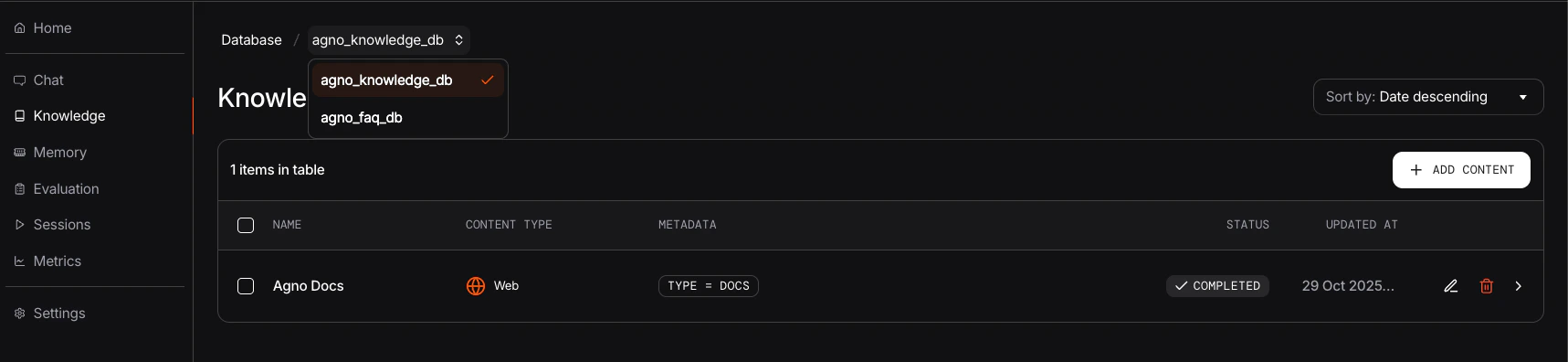
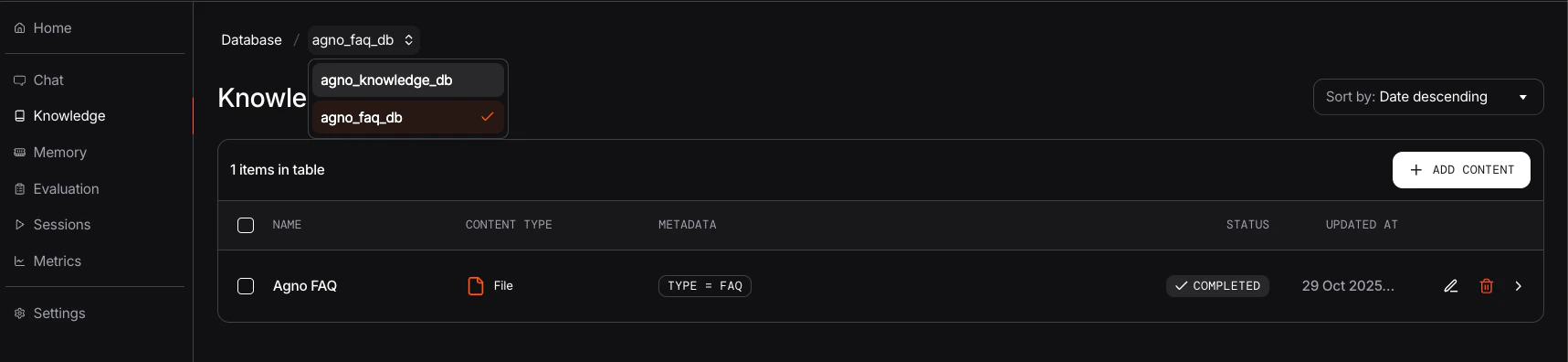
The screenshots below show how you can access and manage your different Knowledge bases through the AgentOS interface:
 ## Managing Knowledge via AgentOS control plane
Once your Knowledge bases are attached to AgentOS, you can:
* **View Content**: Browse and search through your Knowledge base contents
* **Add Content**: Upload new documents, add URLs, or input text directly
* **Edit Content**: Modify metadata on existing Knowledge entries
* **Delete Content**: Remove outdated or incorrect information
## Best Practices
* **Separate Knowledge by Domain**: Create separate Knowledge bases for different topics (e.g., technical docs, FAQs, policies)
* **Consistent Naming**: Use descriptive names for your Knowledge bases that reflect their content
* **Regular Updates**: Keep your Knowledge bases current by regularly adding new content and removing outdated information
* **Monitor Performance**: Use different table names for vector storage to avoid conflicts
* **Content Organization**: Use the `name` parameter when adding content to make it easily identifiable
## Troubleshooting
Ensure your knowledge base is properly added to the `knowledge` parameter when creating your AgentOS instance.
Also make sure to attach a `contents_db` to your Knowledge instance.
Verify your PostgreSQL connection string and ensure the database is running and accessible.
Check that your content has been properly embedded by verifying entries in your vector database table.
## Managing Knowledge via AgentOS control plane
Once your Knowledge bases are attached to AgentOS, you can:
* **View Content**: Browse and search through your Knowledge base contents
* **Add Content**: Upload new documents, add URLs, or input text directly
* **Edit Content**: Modify metadata on existing Knowledge entries
* **Delete Content**: Remove outdated or incorrect information
## Best Practices
* **Separate Knowledge by Domain**: Create separate Knowledge bases for different topics (e.g., technical docs, FAQs, policies)
* **Consistent Naming**: Use descriptive names for your Knowledge bases that reflect their content
* **Regular Updates**: Keep your Knowledge bases current by regularly adding new content and removing outdated information
* **Monitor Performance**: Use different table names for vector storage to avoid conflicts
* **Content Organization**: Use the `name` parameter when adding content to make it easily identifiable
## Troubleshooting
Ensure your knowledge base is properly added to the `knowledge` parameter when creating your AgentOS instance.
Also make sure to attach a `contents_db` to your Knowledge instance.
Verify your PostgreSQL connection string and ensure the database is running and accessible.
Check that your content has been properly embedded by verifying entries in your vector database table.