> ## Documentation Index
> Fetch the complete documentation index at: https://spacesail.mintlify.site/llms.txt
> Use this file to discover all available pages before exploring further.
# Async Tools
> Learn how to use async tools in Agno.
Agno Agents can execute multiple tools concurrently, allowing you to process function calls that the model makes efficiently. This is especially valuable when the functions involve time-consuming operations. It improves responsiveness and reduces overall execution time.
When you call `arun` or `aprint_response`, your tools will execute concurrently. If you provide synchronous functions as tools, they will execute concurrently on separate threads.
## Example
Here is an example:
```python async_tools.py theme={null}
import asyncio
import time
from agno.agent import Agent
from agno.models.openai import OpenAIChat
from agno.utils.log import logger
async def atask1(delay: int):
"""Simulate a task that takes a random amount of time to complete
Args:
delay (int): The amount of time to delay the task
"""
logger.info("Task 1 has started")
for _ in range(delay):
await asyncio.sleep(1)
logger.info("Task 1 has slept for 1s")
logger.info("Task 1 has completed")
return f"Task 1 completed in {delay:.2f}s"
async def atask2(delay: int):
"""Simulate a task that takes a random amount of time to complete
Args:
delay (int): The amount of time to delay the task
"""
logger.info("Task 2 has started")
for _ in range(delay):
await asyncio.sleep(1)
logger.info("Task 2 has slept for 1s")
logger.info("Task 2 has completed")
return f"Task 2 completed in {delay:.2f}s"
async def atask3(delay: int):
"""Simulate a task that takes a random amount of time to complete
Args:
delay (int): The amount of time to delay the task
"""
logger.info("Task 3 has started")
for _ in range(delay):
await asyncio.sleep(1)
logger.info("Task 3 has slept for 1s")
logger.info("Task 3 has completed")
return f"Task 3 completed in {delay:.2f}s"
async_agent = Agent(
model=OpenAIChat(id="gpt-5-mini"),
tools=[atask2, atask1, atask3],
markdown=True,
)
asyncio.run(
async_agent.aprint_response("Please run all tasks with a delay of 3s", stream=True)
)
```
Run the Agent:
```bash theme={null}
pip install -U agno openai
export OPENAI_API_KEY=***
python async_tools.py
```
How to use:
1. Provide your Agent with a list of tools, preferably asynchronous for optimal performance. However, synchronous functions can also be used since they will execute concurrently on separate threads.
2. Run the Agent using either the `arun` or `aprint_response` method, enabling concurrent execution of tool calls.
Concurrent execution of tools requires a model that supports parallel function
calling. For example, OpenAI models have a `parallel_tool_calls` parameter
(enabled by default) that allows multiple tool calls to be requested and
executed simultaneously.
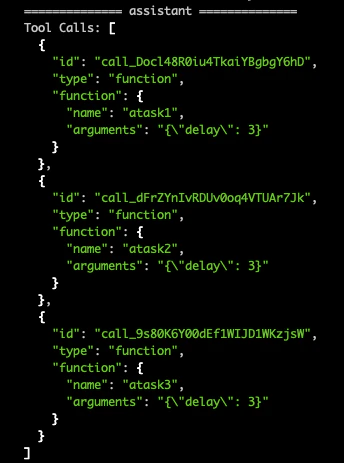
In this example, `gpt-5-mini` makes three simultaneous tool calls to `atask1`, `atask2` and `atask3`. Normally these tool calls would execute sequentially, but using the `aprint_response` function, they run concurrently, improving execution time.