> ## Documentation Index
> Fetch the complete documentation index at: https://spacesail.mintlify.site/llms.txt
> Use this file to discover all available pages before exploring further.
# Use Custom Domain and HTTPS
## Overview
To add a live AgentOS instance to os.agno.com, the endpoint must be HTTPS. Here is how you can add a custom domain and HTTPS to your AWS loadbalancer.
## Use a custom domain
1. Register your domain with [Route 53](https://us-east-1.console.aws.amazon.com/route53/).
2. Point the domain to the loadbalancer DNS.
### Custom domain for your AgentOS App
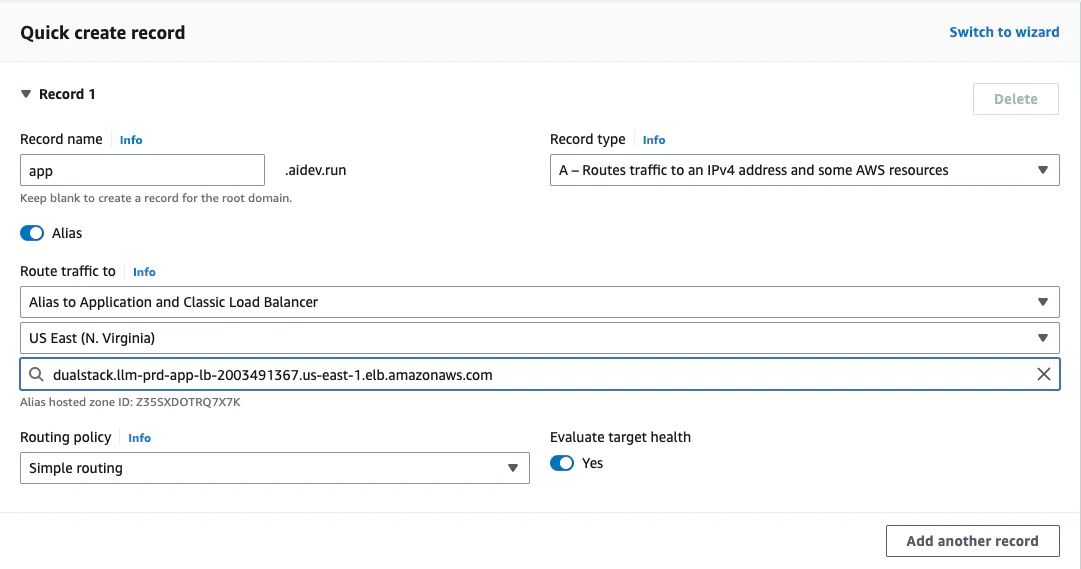
Create a record in the Route53 console to point `app.[YOUR_DOMAIN]` to the AgentOS endpoint.
 You can visit the app at `[http://app.[YOUR_DOMAIN]`
Note the `http` in the domain name.
## Add HTTPS
To add HTTPS:
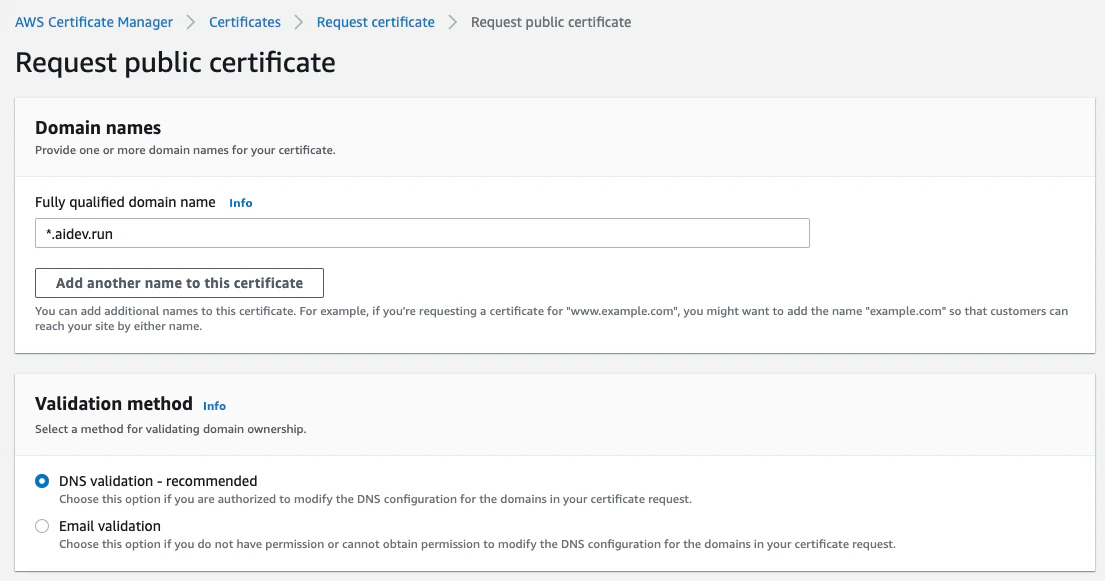
1. Create a certificate using [AWS ACM](https://us-east-1.console.aws.amazon.com/acm). Request a certificat for `*.[YOUR_DOMAIN]`
You can visit the app at `[http://app.[YOUR_DOMAIN]`
Note the `http` in the domain name.
## Add HTTPS
To add HTTPS:
1. Create a certificate using [AWS ACM](https://us-east-1.console.aws.amazon.com/acm). Request a certificat for `*.[YOUR_DOMAIN]`
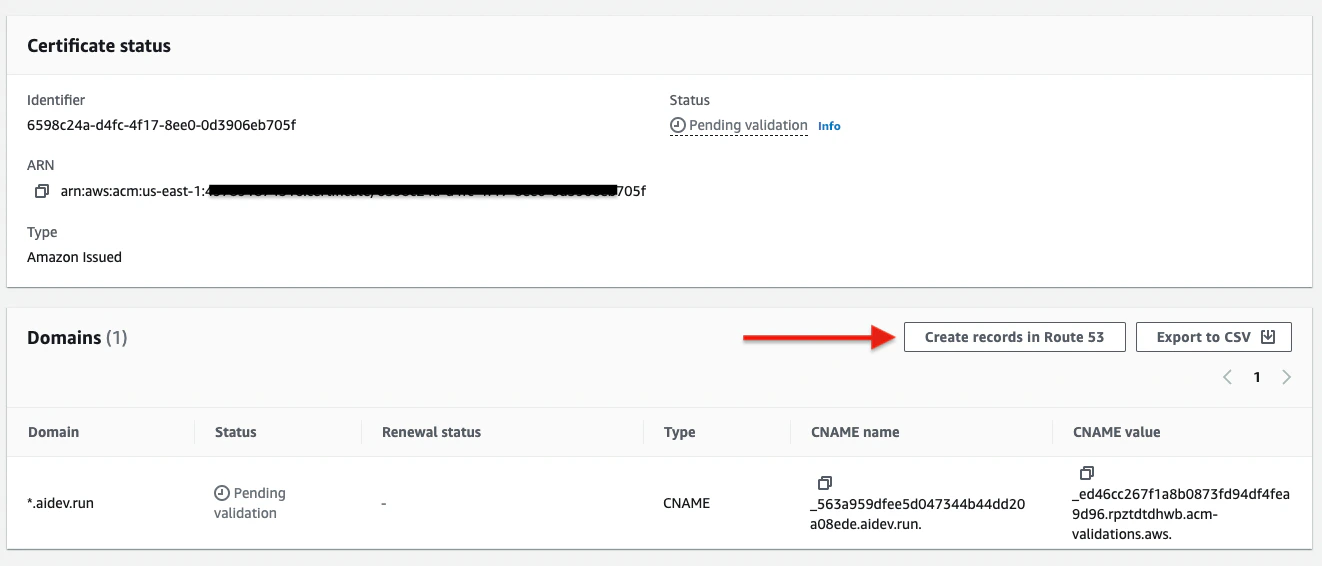
 2. Creating records in Route 53.
 3. Add the certificate ARN to Apps
Make sure the certificate is `Issued` before adding it to your Apps
Update the `infra/prd_resources.py` file and add the `load_balancer_certificate_arn` to the `FastAPI` app.
```python infra/prd_resources.py theme={null}
# -*- FastAPI running on ECS
prd_fastapi = FastApi(
...
# To enable HTTPS, create an ACM certificate and add the ARN below:
load_balancer_enable_https=True,
load_balancer_certificate_arn="arn:aws:acm:us-east-1:497891874516:certificate/6598c24a-d4fc-4f17-8ee0-0d3906eb705f",
...
)
```
4. Create new Loadbalancer Listeners
Create new listeners for the loadbalancer to pickup the HTTPs configuration.
```bash terminal theme={null}
ag infra up --env prd --infra aws --name listener
```
```bash shorthand theme={null}
ag infra up -e prd -i aws -n listener
```
The certificate should be `Issued` before applying it.
After this, `https` should be working on your custom domain.
5. Update existing listeners to redirect HTTP to HTTPS
```bash terminal theme={null}
ag infra patch --env prd --infra aws --name listener
```
```bash shorthand theme={null}
ag infra patch -e prd -i aws -n listener
```
After this, all HTTP requests should redirect to HTTPS automatically.
3. Add the certificate ARN to Apps
Make sure the certificate is `Issued` before adding it to your Apps
Update the `infra/prd_resources.py` file and add the `load_balancer_certificate_arn` to the `FastAPI` app.
```python infra/prd_resources.py theme={null}
# -*- FastAPI running on ECS
prd_fastapi = FastApi(
...
# To enable HTTPS, create an ACM certificate and add the ARN below:
load_balancer_enable_https=True,
load_balancer_certificate_arn="arn:aws:acm:us-east-1:497891874516:certificate/6598c24a-d4fc-4f17-8ee0-0d3906eb705f",
...
)
```
4. Create new Loadbalancer Listeners
Create new listeners for the loadbalancer to pickup the HTTPs configuration.
```bash terminal theme={null}
ag infra up --env prd --infra aws --name listener
```
```bash shorthand theme={null}
ag infra up -e prd -i aws -n listener
```
The certificate should be `Issued` before applying it.
After this, `https` should be working on your custom domain.
5. Update existing listeners to redirect HTTP to HTTPS
```bash terminal theme={null}
ag infra patch --env prd --infra aws --name listener
```
```bash shorthand theme={null}
ag infra patch -e prd -i aws -n listener
```
After this, all HTTP requests should redirect to HTTPS automatically.