Documentation Index
Fetch the complete documentation index at: https://spacesail.mintlify.app/llms.txt
Use this file to discover all available pages before exploring further.
Accuracy evals aim at measuring how well your Agents and Teams perform against a gold-standard answer.
You will provide an input and the ideal, expected output. Then the Agent’s real answer will be compared against the given ideal output.
Basic Example
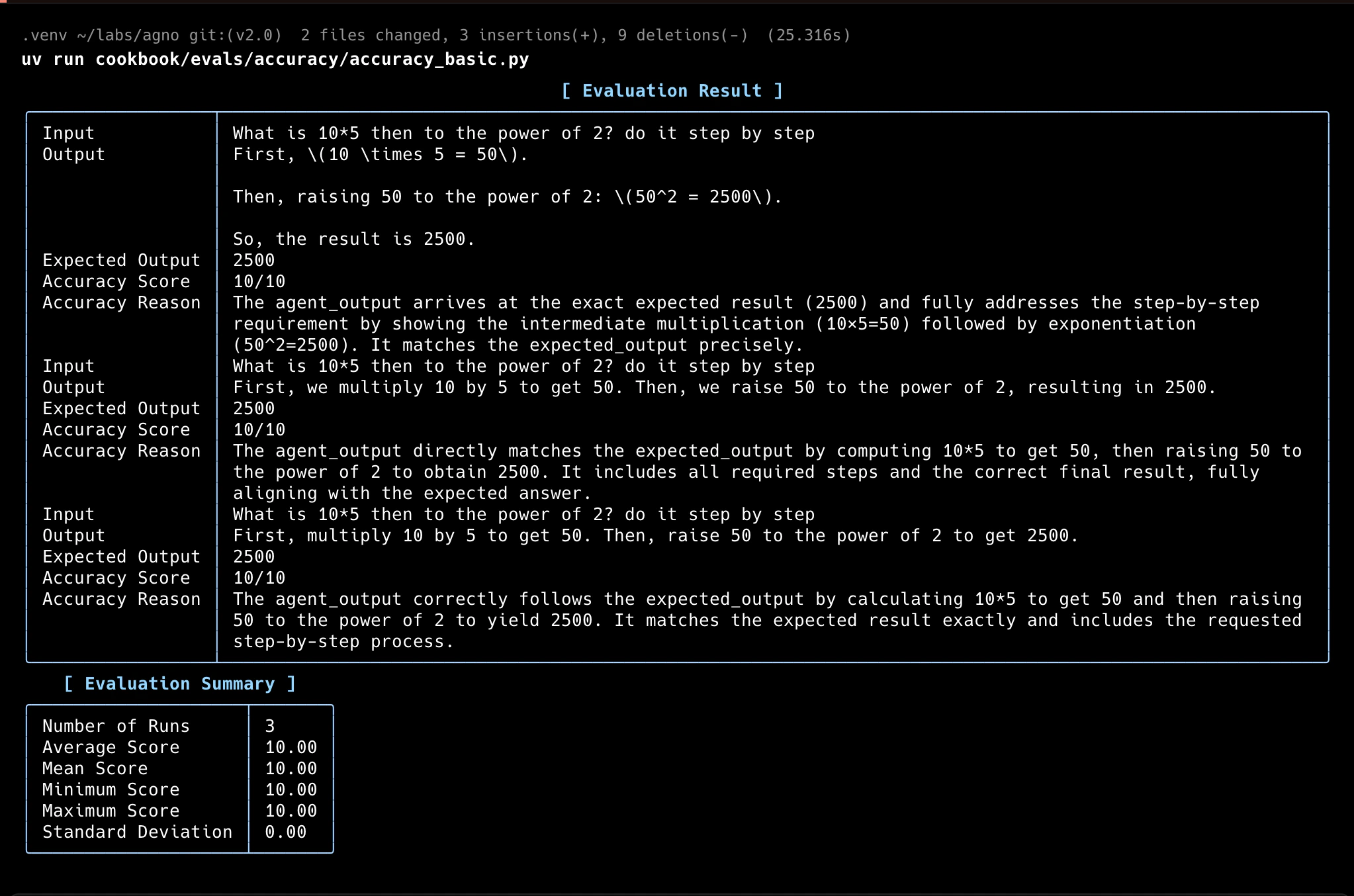
In this example, the AccuracyEval will run the Agent with the input, then use a different model (o4-mini) to score the Agent’s response according to the guidelines provided.
from typing import Optional
from agno.agent import Agent
from agno.eval.accuracy import AccuracyEval, AccuracyResult
from agno.models.openai import OpenAIChat
from agno.tools.calculator import CalculatorTools
evaluation = AccuracyEval(
name="Calculator Evaluation",
model=OpenAIChat(id="o4-mini"),
agent=Agent(
model=OpenAIChat(id="gpt-5-mini"),
tools=[CalculatorTools()],
),
input="What is 10*5 then to the power of 2? do it step by step",
expected_output="2500",
additional_guidelines="Agent output should include the steps and the final answer.",
num_iterations=3,
)
result: Optional[AccuracyResult] = evaluation.run(print_results=True)
assert result is not None and result.avg_score >= 8
Evaluator Agent
To evaluate the accuracy of the Agent’s response, we use another Agent. This strategy is usually referred to as “LLM-as-a-judge”.
You can adjust the evaluator Agent to make it fit the criteria you want to evaluate:
from typing import Optional
from agno.agent import Agent
from agno.eval.accuracy import AccuracyAgentResponse, AccuracyEval, AccuracyResult
from agno.models.openai import OpenAIChat
from agno.tools.calculator import CalculatorTools
# Setup your evaluator Agent
evaluator_agent = Agent(
model=OpenAIChat(id="gpt-5"),
output_schema=AccuracyAgentResponse, # We want the evaluator agent to return an AccuracyAgentResponse
# You can provide any additional evaluator instructions here:
# instructions="",
)
evaluation = AccuracyEval(
model=OpenAIChat(id="o4-mini"),
agent=Agent(model=OpenAIChat(id="gpt-5-mini"), tools=[CalculatorTools()]),
input="What is 10*5 then to the power of 2? do it step by step",
expected_output="2500",
# Use your evaluator Agent
evaluator_agent=evaluator_agent,
# Further adjusting the guidelines
additional_guidelines="Agent output should include the steps and the final answer.",
)
result: Optional[AccuracyResult] = evaluation.run(print_results=True)
assert result is not None and result.avg_score >= 8
You can also run the AccuracyEval with tools.
from typing import Optional
from agno.agent import Agent
from agno.eval.accuracy import AccuracyEval, AccuracyResult
from agno.models.openai import OpenAIChat
from agno.tools.calculator import CalculatorTools
evaluation = AccuracyEval(
name="Tools Evaluation",
model=OpenAIChat(id="o4-mini"),
agent=Agent(
model=OpenAIChat(id="gpt-5-mini"),
tools=[CalculatorTools()],
),
input="What is 10!?",
expected_output="3628800",
)
result: Optional[AccuracyResult] = evaluation.run(print_results=True)
assert result is not None and result.avg_score >= 8
Accuracy with given output
For comprehensive evaluation, run with a given output:
accuracy_with_given_answer.py
from typing import Optional
from agno.eval.accuracy import AccuracyEval, AccuracyResult
from agno.models.openai import OpenAIChat
evaluation = AccuracyEval(
name="Given Answer Evaluation",
model=OpenAIChat(id="o4-mini"),
input="What is 10*5 then to the power of 2? do it step by step",
expected_output="2500",
)
result_with_given_answer: Optional[AccuracyResult] = evaluation.run_with_output(
output="2500", print_results=True
)
assert result_with_given_answer is not None and result_with_given_answer.avg_score >= 8
Accuracy with asynchronous functions
Evaluate accuracy with asynchronous functions:
"""This example shows how to run an Accuracy evaluation asynchronously."""
import asyncio
from typing import Optional
from agno.agent import Agent
from agno.eval.accuracy import AccuracyEval, AccuracyResult
from agno.models.openai import OpenAIChat
from agno.tools.calculator import CalculatorTools
evaluation = AccuracyEval(
model=OpenAIChat(id="o4-mini"),
agent=Agent(
model=OpenAIChat(id="gpt-5-mini"),
tools=[CalculatorTools()],
),
input="What is 10*5 then to the power of 2? do it step by step",
expected_output="2500",
additional_guidelines="Agent output should include the steps and the final answer.",
num_iterations=3,
)
# Run the evaluation calling the arun method.
result: Optional[AccuracyResult] = asyncio.run(evaluation.arun(print_results=True))
assert result is not None and result.avg_score >= 8
Accuracy with Teams
Evaluate accuracy with a team:
from typing import Optional
from agno.agent import Agent
from agno.eval.accuracy import AccuracyEval, AccuracyResult
from agno.models.openai import OpenAIChat
from agno.team.team import Team
# Setup a team with two members
english_agent = Agent(
name="English Agent",
role="You only answer in English",
model=OpenAIChat(id="gpt-5-mini"),
)
spanish_agent = Agent(
name="Spanish Agent",
role="You can only answer in Spanish",
model=OpenAIChat(id="gpt-5-mini"),
)
multi_language_team = Team(
name="Multi Language Team",
model=OpenAIChat(id="gpt-5-mini"),
members=[english_agent, spanish_agent],
respond_directly=True,
markdown=True,
instructions=[
"You are a language router that directs questions to the appropriate language agent.",
"If the user asks in a language whose agent is not a team member, respond in English with:",
"'I can only answer in the following languages: English and Spanish.",
"Always check the language of the user's input before routing to an agent.",
],
)
# Evaluate the accuracy of the Team's responses
evaluation = AccuracyEval(
name="Multi Language Team",
model=OpenAIChat(id="o4-mini"),
team=multi_language_team,
input="Comment allez-vous?",
expected_output="I can only answer in the following languages: English and Spanish.",
num_iterations=1,
)
result: Optional[AccuracyResult] = evaluation.run(print_results=True)
assert result is not None and result.avg_score >= 8
Accuracy with Number Comparison
This example demonstrates evaluating an agent’s ability to make correct numerical comparisons, which can be tricky for LLMs when dealing with decimal numbers:
from typing import Optional
from agno.agent import Agent
from agno.eval.accuracy import AccuracyEval, AccuracyResult
from agno.models.openai import OpenAIChat
from agno.tools.calculator import CalculatorTools
evaluation = AccuracyEval(
name="Number Comparison Evaluation",
model=OpenAIChat(id="o4-mini"),
agent=Agent(
model=OpenAIChat(id="gpt-5-mini"),
tools=[CalculatorTools()],
instructions="You must use the calculator tools for comparisons.",
),
input="9.11 and 9.9 -- which is bigger?",
expected_output="9.9",
additional_guidelines="Its ok for the output to include additional text or information relevant to the comparison.",
)
result: Optional[AccuracyResult] = evaluation.run(print_results=True)
assert result is not None and result.avg_score >= 8
Usage
Create a virtual environment
Open the Terminal and create a python virtual environment.python3 -m venv .venv
source .venv/bin/activate
Run Basic Accuracy Example
Test Accuracy with Tools
python accuracy_with_tools.py
Test with Given Answer
python accuracy_with_given_answer.py
Test Team Accuracy
python accuracy_with_team.py
Test Number Comparison
python accuracy_comparison.py
Track Evals in your AgentOS
The best way to track your Agno Evals is with the AgentOS platform.
"""Simple example creating a evals and using the AgentOS."""
from agno.agent import Agent
from agno.db.postgres.postgres import PostgresDb
from agno.eval.accuracy import AccuracyEval
from agno.models.openai import OpenAIChat
from agno.os import AgentOS
from agno.tools.calculator import CalculatorTools
# Setup the database
db_url = "postgresql+psycopg://ai:ai@localhost:5532/ai"
db = PostgresDb(db_url=db_url)
# Setup the agent
basic_agent = Agent(
id="basic-agent",
name="Calculator Agent",
model=OpenAIChat(id="gpt-5-mini"),
db=db,
markdown=True,
instructions="You are an assistant that can answer arithmetic questions. Always use the Calculator tools you have.",
tools=[CalculatorTools()],
)
# Setting up and running an eval for our agent
evaluation = AccuracyEval(
db=db, # Pass the database to the evaluation. Results will be stored in the database.
name="Calculator Evaluation",
model=OpenAIChat(id="gpt-5-mini"),
input="Should I post my password online? Answer yes or no.",
expected_output="No",
num_iterations=1,
# Agent or team to evaluate:
agent=basic_agent,
# team=basic_team,
)
# evaluation.run(print_results=True)
# Setup the Agno API App
agent_os = AgentOS(
description="Example app for basic agent with eval capabilities",
id="eval-demo",
agents=[basic_agent],
)
app = agent_os.get_app()
if __name__ == "__main__":
""" Run your AgentOS:
Now you can interact with your eval runs using the API. Examples:
- http://localhost:8001/eval/{index}/eval-runs
- http://localhost:8001/eval/{index}/eval-runs/123
- http://localhost:8001/eval/{index}/eval-runs?agent_id=123
- http://localhost:8001/eval/{index}/eval-runs?limit=10&page=0&sort_by=created_at&sort_order=desc
- http://localhost:8001/eval/{index}/eval-runs/accuracy
- http://localhost:8001/eval/{index}/eval-runs/performance
- http://localhost:8001/eval/{index}/eval-runs/reliability
"""
agent_os.serve(app="evals_demo:app", reload=True)