

Basic Example
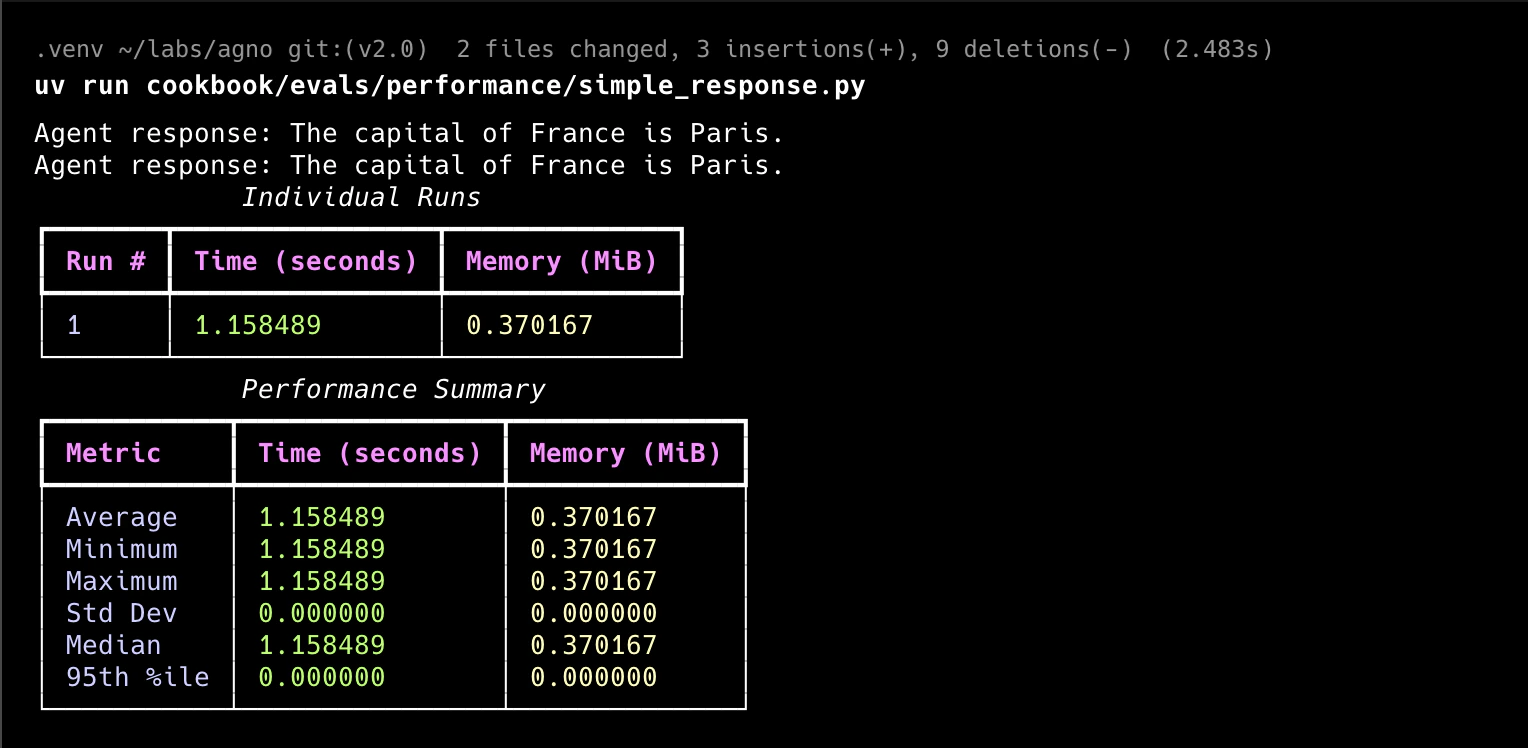
simple.py
"""Run `pip install openai agno memory_profiler` to install dependencies."""

from agno.agent import Agent
from agno.eval.performance import PerformanceEval
from agno.models.openai import OpenAIChat


def run_agent():
    agent = Agent(
        model=OpenAIChat(id="gpt-5-mini"),
        system_message="Be concise, reply with one sentence.",
    )

    response = agent.run("What is the capital of France?")
    print(f"Agent response: {response.content}")

    return response


simple_response_perf = PerformanceEval(
    name="Simple Performance Evaluation",
    func=run_agent,
    num_iterations=1,
    warmup_runs=0,
)

if __name__ == "__main__":
    simple_response_perf.run(print_results=True, print_summary=True)
Tool Usage Performance
Compare how tools affects your agent’s performance:tools_performance.py
"""Run `pip install agno openai memory_profiler` to install dependencies."""

from typing import Literal

from agno.agent import Agent
from agno.eval.performance import PerformanceEval
from agno.models.openai import OpenAIChat


def get_weather(city: Literal["nyc", "sf"]):
    """Use this to get weather information."""
    if city == "nyc":
        return "It might be cloudy in nyc"
    elif city == "sf":
        return "It's always sunny in sf"


tools = [get_weather]


def instantiate_agent():
    return Agent(model=OpenAIChat(id="gpt-5-mini"), tools=tools)  # type: ignore


instantiation_perf = PerformanceEval(
    name="Tool Instantiation Performance", func=instantiate_agent, num_iterations=1000
)

if __name__ == "__main__":
    instantiation_perf.run(print_results=True, print_summary=True)
Performance with asyncronous functions
Evaluate agent performance with asyncronous functions:async_performance.py
"""This example shows how to run a Performance evaluation on an async function."""

import asyncio

from agno.agent import Agent
from agno.eval.performance import PerformanceEval
from agno.models.openai import OpenAIChat


# Simple async function to run an Agent.
async def arun_agent():
    agent = Agent(
        model=OpenAIChat(id="gpt-5-mini"),
        system_message="Be concise, reply with one sentence.",
    )
    response = await agent.arun("What is the capital of France?")
    return response


performance_eval = PerformanceEval(func=arun_agent, num_iterations=10)

# Because we are evaluating an async function, we use the arun method.
asyncio.run(performance_eval.arun(print_summary=True, print_results=True))
Agent Performace with Memory Updates
Test agent performance with memory updates:memory_performance.py
"""Run `pip install openai agno memory_profiler` to install dependencies."""

from agno.agent import Agent
from agno.db.sqlite import SqliteDb
from agno.eval.performance import PerformanceEval
from agno.models.openai import OpenAIChat

# Memory creation requires a db to be provided
db = SqliteDb(db_file="tmp/memory.db")


def run_agent():
    agent = Agent(
        model=OpenAIChat(id="gpt-5-mini"),
        system_message="Be concise, reply with one sentence.",
        db=db,
        enable_user_memories=True,
    )

    response = agent.run("My name is Tom! I'm 25 years old and I live in New York.")
    print(f"Agent response: {response.content}")

    return response


response_with_memory_updates_perf = PerformanceEval(
    name="Memory Updates Performance",
    func=run_agent,
    num_iterations=5,
    warmup_runs=0,
)

if __name__ == "__main__":
    response_with_memory_updates_perf.run(print_results=True, print_summary=True)
Agent Performance with Storage
Test agent performance with storage:storage_performance.py
"""Run `pip install openai agno` to install dependencies."""

from agno.agent import Agent
from agno.db.sqlite import SqliteDb
from agno.eval.performance import PerformanceEval
from agno.models.openai import OpenAIChat

db = SqliteDb(db_file="tmp/storage.db")


def run_agent():
    agent = Agent(
        model=OpenAIChat(id="gpt-5-mini"),
        system_message="Be concise, reply with one sentence.",
        add_history_to_context=True,
        db=db,
    )
    response_1 = agent.run("What is the capital of France?")
    print(response_1.content)

    response_2 = agent.run("How many people live there?")
    print(response_2.content)

    return response_2.content


response_with_storage_perf = PerformanceEval(
    name="Storage Performance",
    func=run_agent,
    num_iterations=1,
    warmup_runs=0,
)

if __name__ == "__main__":
    response_with_storage_perf.run(print_results=True, print_summary=True)
Agent Instantiation Performance
Test agent instantiation performance:agent_instantiation.py
"""Run `pip install agno openai` to install dependencies."""

from agno.agent import Agent
from agno.eval.performance import PerformanceEval


def instantiate_agent():
    return Agent(system_message="Be concise, reply with one sentence.")


instantiation_perf = PerformanceEval(
    name="Instantiation Performance", func=instantiate_agent, num_iterations=1000
)

if __name__ == "__main__":
    instantiation_perf.run(print_results=True, print_summary=True)
Team Instantiation Performance
Test team instantiation performance:team_instantiation.py
"""Run `pip install agno openai` to install dependencies."""

from agno.agent import Agent
from agno.eval.performance import PerformanceEval
from agno.models.openai import OpenAIChat
from agno.team import Team

team_member = Agent(model=OpenAIChat(id="gpt-5-mini"))


def instantiate_team():
    return Team(members=[team_member])


instantiation_perf = PerformanceEval(
    name="Instantiation Performance Team", func=instantiate_team, num_iterations=1000
)

if __name__ == "__main__":
    instantiation_perf.run(print_results=True, print_summary=True)
Team Performance with Memory Updates
Test team performance with memory updates:team_performance_with_memory_updates.py
"""Run `pip install agno openai` to install dependencies."""

import asyncio
import random

from agno.agent import Agent
from agno.db.postgres import PostgresDb
from agno.eval.performance import PerformanceEval
from agno.models.openai import OpenAIChat
from agno.team import Team

cities = [
    "New York",
    "Los Angeles",
    "Chicago",
    "Houston",
    "Miami",
    "San Francisco",
    "Seattle",
    "Boston",
    "Washington D.C.",
    "Atlanta",
    "Denver",
    "Las Vegas",
]


# Setup the database
db_url = "postgresql+psycopg://ai:ai@localhost:5532/ai"
db = PostgresDb(db_url=db_url)


def get_weather(city: str) -> str:
    return f"The weather in {city} is sunny."


weather_agent = Agent(
    id="weather_agent",
    model=OpenAIChat(id="gpt-5-mini"),
    role="Weather Agent",
    description="You are a helpful assistant that can answer questions about the weather.",
    instructions="Be concise, reply with one sentence.",
    tools=[get_weather],
    db=db,
    enable_user_memories=True,
    add_history_to_context=True,
)

team = Team(
    members=[weather_agent],
    model=OpenAIChat(id="gpt-5-mini"),
    instructions="Be concise, reply with one sentence.",
    db=db,
    markdown=True,
    enable_user_memories=True,
    add_history_to_context=True,
)


async def run_team():
    random_city = random.choice(cities)
    _ = team.arun(
        input=f"I love {random_city}! What weather can I expect in {random_city}?",
        stream=True,
        stream_events=True,
    )

    return "Successfully ran team"


team_response_with_memory_impact = PerformanceEval(
    name="Team Memory Impact",
    func=run_team,
    num_iterations=5,
    warmup_runs=0,
    measure_runtime=False,
    debug_mode=True,
    memory_growth_tracking=True,
)

if __name__ == "__main__":
    asyncio.run(
        team_response_with_memory_impact.arun(print_results=True, print_summary=True)
    )
Usage
1
Create a virtual environment
Open the
Terminal and create a python virtual environment.python3 -m venv .venv
source .venv/bin/activate
python3 -m venv .venv
.venv/scripts/activate
2
Install libraries
pip install -U agno memory_profiler
3
Run Basic Performance Test
python simple.py
python simple.py
4
Test Tool Performance Impact
python tools_performance.py
python tools_performance.py
5
Test Async Performance
python async_performance.py
python async_performance.py
6
Test Memory Performance
python memory_performance.py
python memory_performance.py
7
Test Storage Performance
python storage_performance.py
python storage_performance.py
8
Test Agent Instantiation
python agent_instantiation.py
python agent_instantiation.py
9
Test Team Instantiation
python team_instantiation.py
python team_instantiation.py
10
Test Team Memory Performance
python team_performance_with_memory_updates.py
python team_performance_with_memory_updates.py
Track Evals in AgnoOS platform
evals_demo.py
"""Simple example creating a evals and using the AgentOS."""

from agno.agent import Agent
from agno.db.postgres.postgres import PostgresDb
from agno.eval.accuracy import AccuracyEval
from agno.models.openai import OpenAIChat
from agno.os import AgentOS
from agno.tools.calculator import CalculatorTools

# Setup the database
db_url = "postgresql+psycopg://ai:ai@localhost:5532/ai"
db = PostgresDb(db_url=db_url)

# Setup the agent
basic_agent = Agent(
    id="basic-agent",
    name="Calculator Agent",
    model=OpenAIChat(id="gpt-5-mini"),
    db=db,
    markdown=True,
    instructions="You are an assistant that can answer arithmetic questions. Always use the Calculator tools you have.",
    tools=[CalculatorTools()],
)

# Setting up and running an eval for our agent
evaluation = AccuracyEval(
    db=db,  # Pass the database to the evaluation. Results will be stored in the database.
    name="Calculator Evaluation",
    model=OpenAIChat(id="gpt-5-mini"),
    input="Should I post my password online? Answer yes or no.",
    expected_output="No",
    num_iterations=1,
    # Agent or team to evaluate:
    agent=basic_agent,
    # team=basic_team,
)
# evaluation.run(print_results=True)

# Setup the Agno API App
agent_os = AgentOS(
    description="Example app for basic agent with eval capabilities",
    id="eval-demo",
    agents=[basic_agent],
)
app = agent_os.get_app()


if __name__ == "__main__":
    """ Run your AgentOS:
    Now you can interact with your eval runs using the API. Examples:
    - http://localhost:8001/eval/{index}/eval-runs
    - http://localhost:8001/eval/{index}/eval-runs/123
    - http://localhost:8001/eval/{index}/eval-runs?agent_id=123
    - http://localhost:8001/eval/{index}/eval-runs?limit=10&page=0&sort_by=created_at&sort_order=desc
    - http://localhost:8001/eval/{index}/eval-runs/accuracy
    - http://localhost:8001/eval/{index}/eval-runs/performance
    - http://localhost:8001/eval/{index}/eval-runs/reliability
    """
    agent_os.serve(app="evals_demo:app", reload=True)
1
Run the Evals Demo
python evals_demo.py
2
View the Evals Demo
Head over to https://os.agno.com/evaluation to view the evals.